ClaudeButtons
claudebuttons.com ↗A Stream Deck plugin that turns physical keys into a control surface for Claude Code. Approve or deny a permission prompt with a button click, a center key animates the Claude mark while it is thinking, and skip the keyboard.
I spend a lot of my day in Claude Code, and when you work with a tool all day, a small but very constant friction that shows up all day is Claude asking for permission, and you have to reach back to the keyboard to say yes. Again. And again.
I have used an Elgato Stream Deck for years. It sits next to my keyboard and runs a different set of buttons for every app I open: Figma, Adobe, all the little repetitive things I would rather press than type. So at some point, a few months ago, I made myself a small profile for the device to answer Claude, approve and deny from a physical button, and that helped with the keyboard friction.
Then OpenAI and the boutique keyboard maker Work Louder released the Codex Micro ↗, a little dedicated keypad for Codex. It looks genuinely nice, agent keys that light up with task state, command keys to accept or reject or push-to-talk, a joystick for a handful of skills, and a dial to control how deeply the agent thinks. Work Louder’s line for it is “More Talking, More Doing.” It sold out on day one, which tells you I am not the only person who wants a physical surface for this.
But it is built exclusively for Codex, and while I use Codex a lot, I live in Claude. Second, it is a fixed object, the keycaps are printed. You get a bag of spare caps to swap, and the buttons do what the caps say. That is a quaint 2015 idea.
So all that motivated me to build a better version of my Claude Stream Deck profile, and with a Stream Deck every key is a screen, so I leaned into that.
What’s On the Deck
The core of it is the part I use every minute: answering Claude and knowing what it is doing without reading the screen. The rest are one-thumb shortcuts for the things I reach for all day. Here is the whole layout.
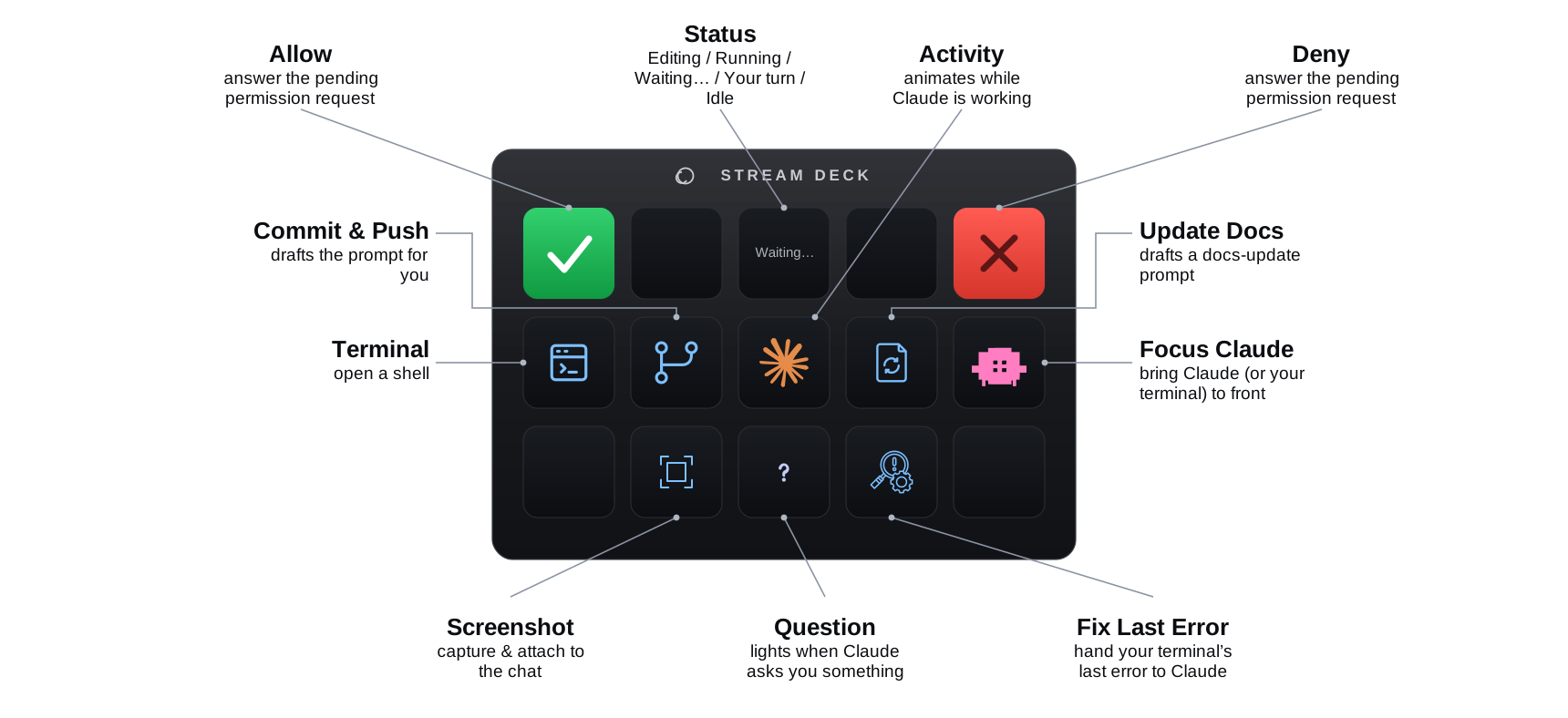
Seeing It Work
Here it is on a real deck, on my desk, next to the laptop. The status key reads Running, the center animates while Claude thinks, and the approve and deny keys are right there under my thumb.
The ClaudeButtons Profile
I call this profile, ClaudeButtons, and it registers a hook inside Claude Code, so when Claude needs approval, it publishes that request locally, the plugin lights the right key, and your press writes the decision back. The same hooks drive both the Claude desktop app and the claude terminal CLI, so the approval and status keys just work in either one.
A few decisions along the way made a big difference:
- It only lights up when Claude actually stops to ask. Anything already on your allow-list is auto-approved and never reaches the deck. The buttons stay quiet until they matter.
- If no deck is connected, nothing changes. It falls back to the normal terminal prompt with zero added latency. The bridge is additive, never in the way.
- On install it touches exactly one file, carefully. The only thing it edits is your Claude settings, and only to merge in its own hook lines. It backs the file up first, validates the JSON, and preserves a symlink if your settings are synced from a dotfiles repo. No open ports, no telemetry.
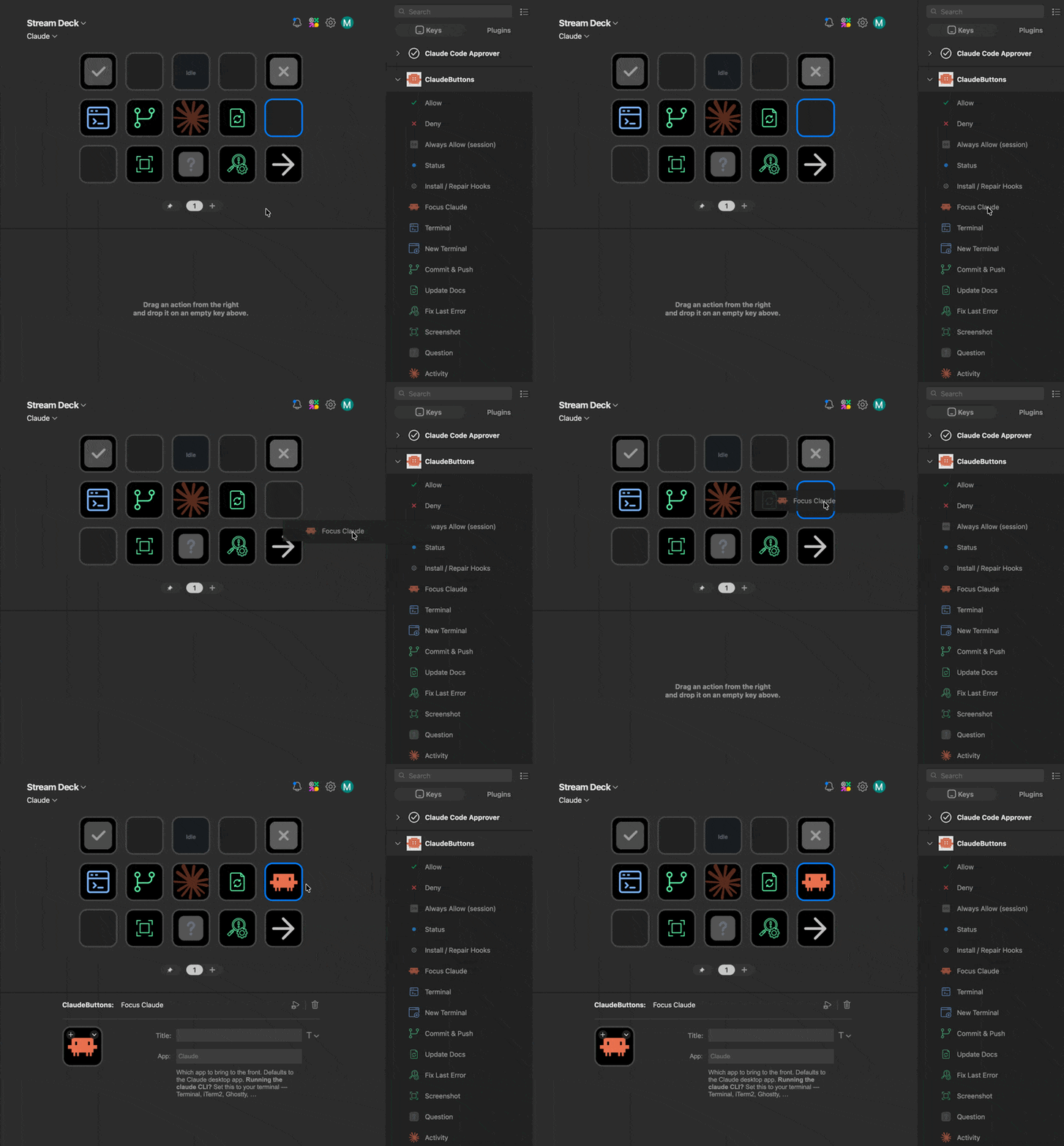
I’m sharing it as a proper Stream Deck profile so anyone with an Elgato Stream Deck can use it. Just download it, double-click, and a ClaudeButtons category shows up in the actions list. Drag on the keys where you want. The approval and status keys work the instant you drop them, because the plugin wires its Claude Code hooks in for you.
It is free, open source under an MIT license, and it lives at claudebuttons.com ↗. It is macOS only for now, since it leans on Mac-only tooling for the keys that type into apps or capture the screen. If you have any Elgato Stream Deck ↗, you can be running it in about a minute.
Taking It Further
Approvals were the itch I had to scratch, but they are the smallest thing a surface like this can do. The deck is a programmable I/O layer sitting next to an agent, and I keep thinking about what else belongs on it.
- Dials for the analog controls. The Codex Micro put thinking-depth on a dial, and that is a genuinely good idea. A Stream Deck+ has dials and a touch strip, so model choice, reasoning effort, and scrolling a long output are all things a knob should own.
- Many agents, at a glance. I increasingly run more than one Claude session at once. A row of keys that shows which session is working, which is blocked on me, and which is done, and lets me jump straight to it, would change how I orchestrate them.
- More one-thumb intents. The workflow keys are just drafted prompts today. There is room for a small, honest set of “do the thing I always ask for” buttons per project.
- Profiles that build themselves. There is already a Stream Deck MCP ↗ that lets an agent author a Stream Deck profile directly: read the hardware, place keys, generate icons, wire up actions. The natural next step is letting Claude lay out a deck for the repo I am in, then hand me the physical buttons for that project.
Claude Code on your Elgato Stream Deck. Approve permission prompts, see what Claude is doing, and drive your workflow from physical buttons.