OptimoClaw
optimoclaw.com ↗An open-source optimization panel for OpenClaw AI agent fleets. Gives you actual controls over token spend, model routing, and agent performance instead of just read-only dashboards.
The Spark
I’ve been running multi-agent systems with OpenClaw and kept hitting the same problem: the cost black box. When you’re running a fleet of agents, every heartbeat, every model call, every context window is burning tokens. But there’s no intuitive way to see where the spend is going or do anything about it without digging through config files.
You shouldn’t need to be a config expert to understand what your agents are costing you.
Why I Built This
Most observability tools for agents are read-only dashboards. They show you charts and metrics but give you no way to actually change anything. I wanted something different: a control surface with actual levers. Model routing controls, tuning sliders, optimization presets, and a recommendation engine that tells you what to change and why.
The design philosophy is simple: use token counts and published pricing rates instead of billing API integration. That eliminates credential requirements and lets you start optimizing immediately.
What It Does
Inside the Token Optimizer
OptimoClaw is a visual control layer for OpenClaw. It reads live agent config and token usage from the gateway, costs it against the current published rate card, and gives you a set of routing and tuning levers you can actually change — without hand-editing openclaw.json.
Five capabilities worth calling out on the Token Optimizer. Three get a closer look below.
Click any marker to expand it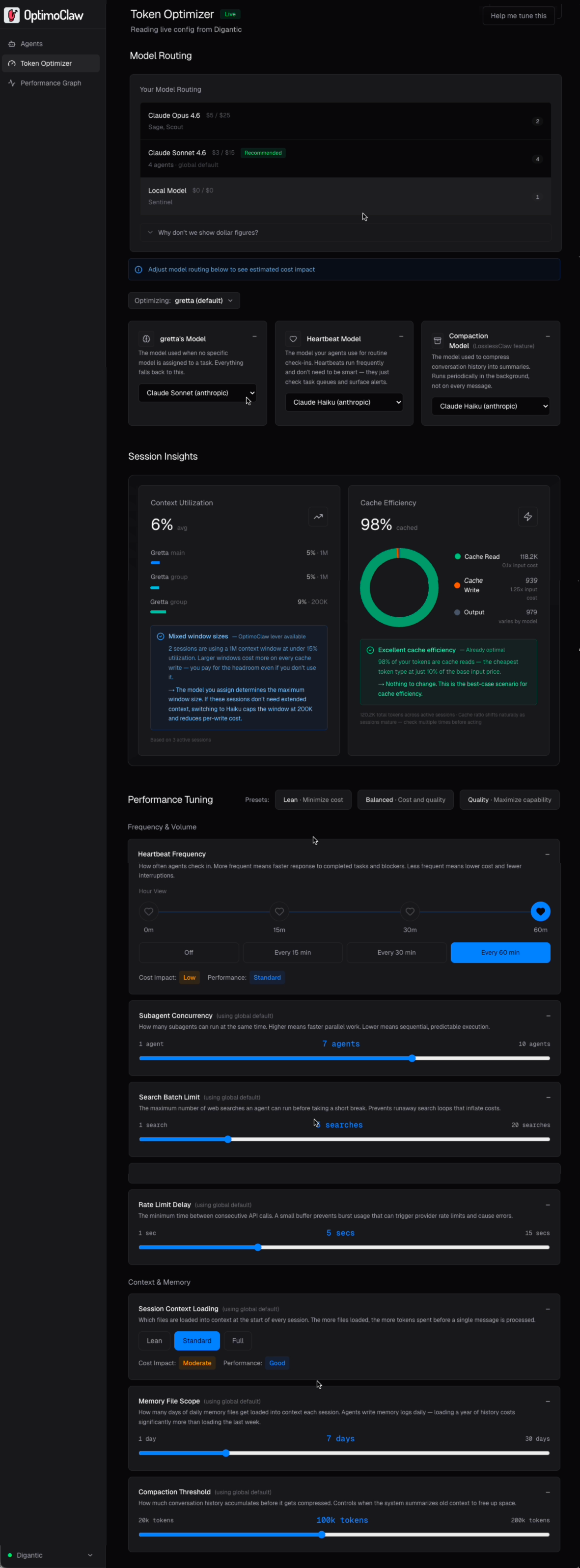
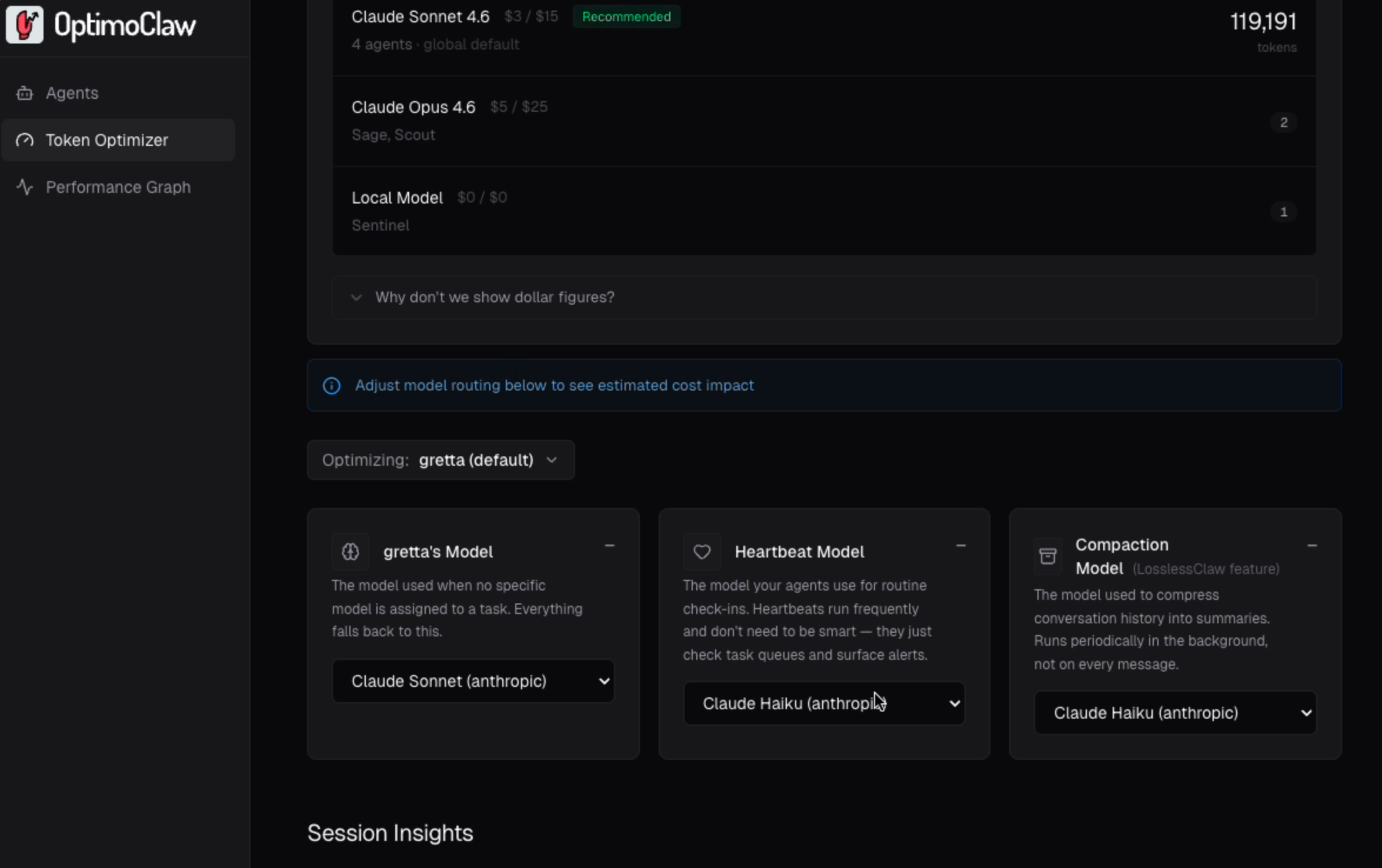
Cost by model, no billing integration
Every model in your gateway shows its published rate per million tokens, which agents are running on it, and how much traffic it's carrying.
Per-agent model routing
Configure each agent's main model, heartbeat model, and compaction model independently. Scoped changes stay on that agent, so a single cost-heavy agent can be tuned without destabilizing the rest of the fleet.
Diagnoses that resolve to a lever
Every insight has to do one of three things: name the lever that fixes it, confirm the value is already optimal, or state plainly that there's no lever for this. No dead-end readouts, no numbers without a next step.
Look closerA big cost lever
Heartbeats are background check-ins that run even when agents are idle. They're one of the largest sources of silent token spend across your agents. You can easily assign a low cost model per agent and adjust the frequency.
Look closerGoal-driven tuning
Pick an intent: Reduce cost, Improve quality, or Faster responses and OptimoClaw proposes a specific set of lever changes.
Look closer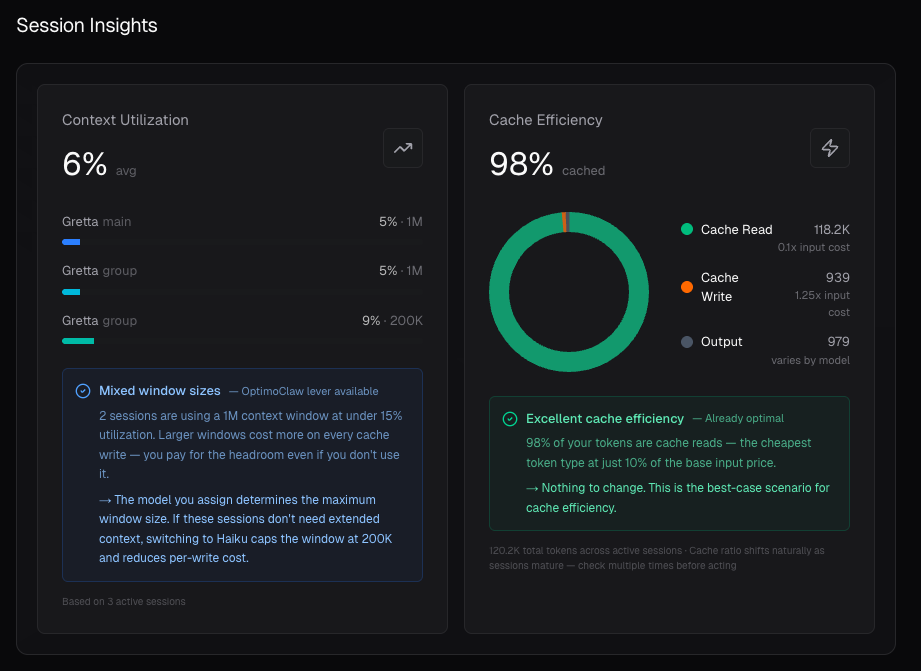
Metrics that resolve to an action
Most agent observability tools report a number and leave you to interpret it. OptimoClaw will either show you the lever that optimizes, confirms the lever is already optimal, or tell you there is no lever for optimization.
A high-write, low-read cache ratio, for example, gets flagged as "likely transient" rather than assumed "bad" because cache behavior shifts naturally as sessions mature, and the goal is to stop the panic lever pull on a metric that will settle on its own.
- Under-utilized context → route to a smaller context model (Haiku caps at 200K).
- Low cache reads → Compaction Threshold or Heartbeat Frequency.
- Already optimal → the insight says so and stops.
Fine-tune heartbeat models
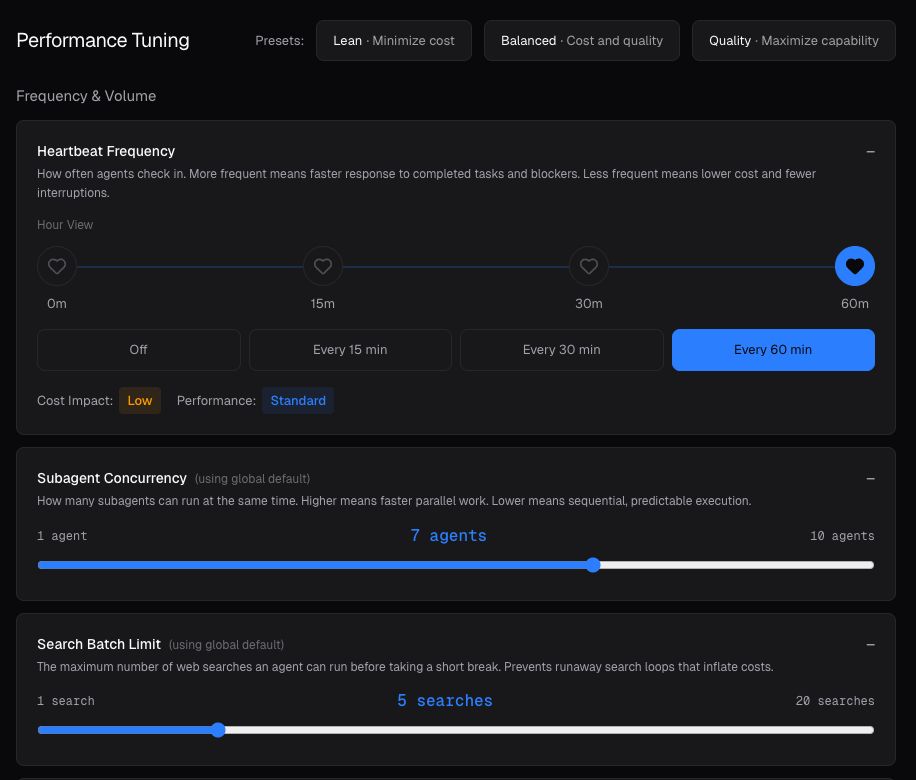
Heartbeats are agents polling to see whether there's work to do. They run on a fixed schedule even when nothing is happening, which is why they quietly drive a large share of monthly spend on any non-trivial fleet.
OptimoClaw makes the cost behavior of this lever obvious: twice as many heartbeats in a window is roughly twice the spend for that lever, so the 15 / 30 / 60 tradeoff stops being abstract and starts being a budget decision.
- Default recommendation for most setups: 30 minutes.
- Moving 30 → 60 halves heartbeat spend with no other change.
- Pairs cleanly with routing heartbeats to Haiku or a local Ollama model.
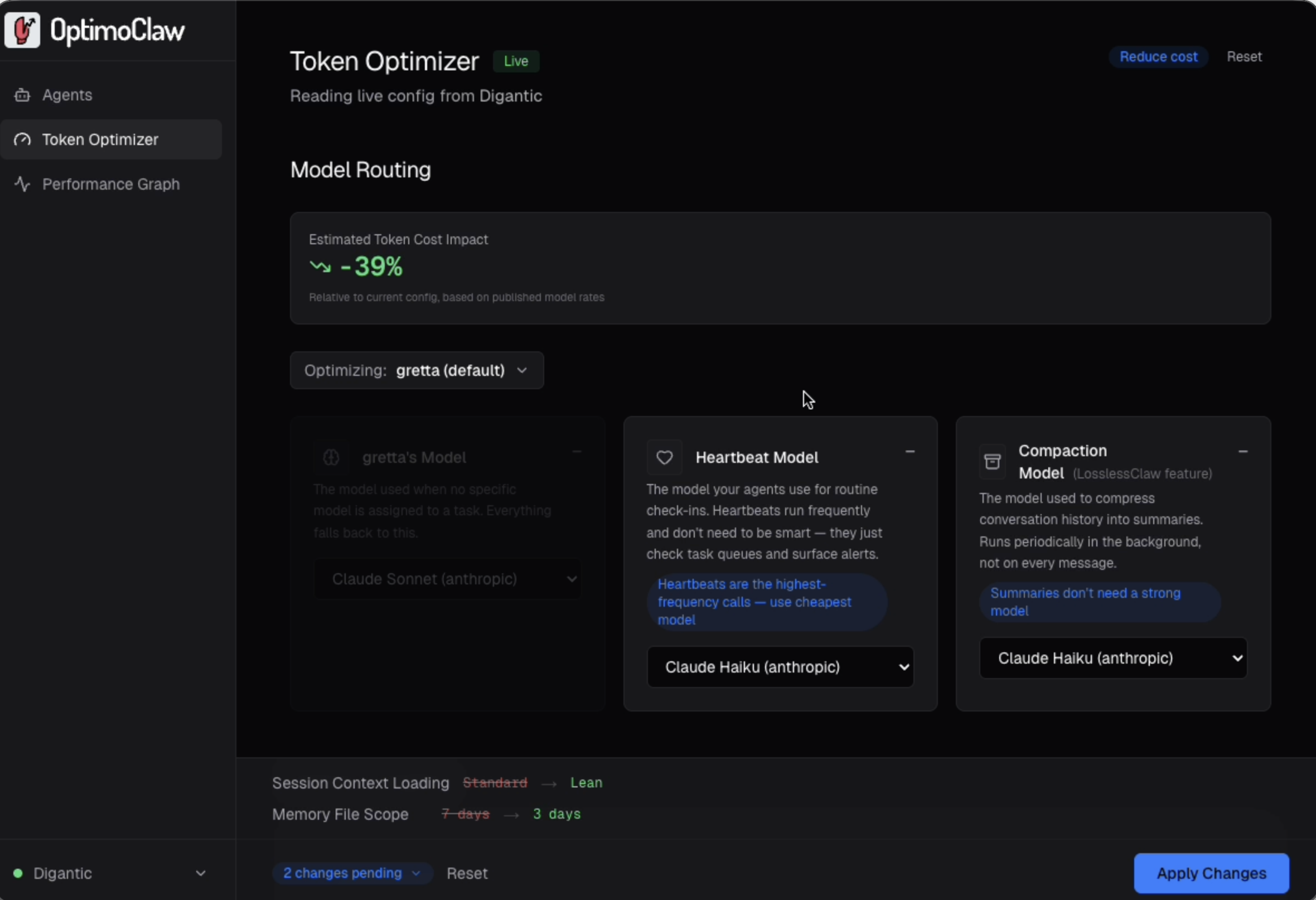
Goal-driven tuning
Pick a pre-defined goal: Reduce cost, Improve quality, or Faster response, and OptimoClaw proposes a specific set of lever changes you can review. Each suggestion carries a short rationale tied to the chosen goal and a single impact number.
You can review the changes, understand their impact and apply them.
Some Learnings
This also worked as a learning for me as a few mildly annoying things became obvious along the way:
- Agents will confidently explain their own setup while being wrong.
- Anthropic billing gets blended together fast once OpenClaw, Claude Code, direct API usage, and compaction are all landing on the same account.
- And a lot of useful optimization is easy to miss simply because the controls are buried.
Where It’s Going
Right now OpenClaw users have no good way to know whether an agent is actually performing well. Token counts and cache ratios tell you about infrastructure and spend, but they don’t tell you whether an agent handled a task effectively.
The next step is task-level telemetry and outcome signals. Not just a tuning dashboard, but a performance layer for agents that treats effectiveness as a first-class metric alongside cost.
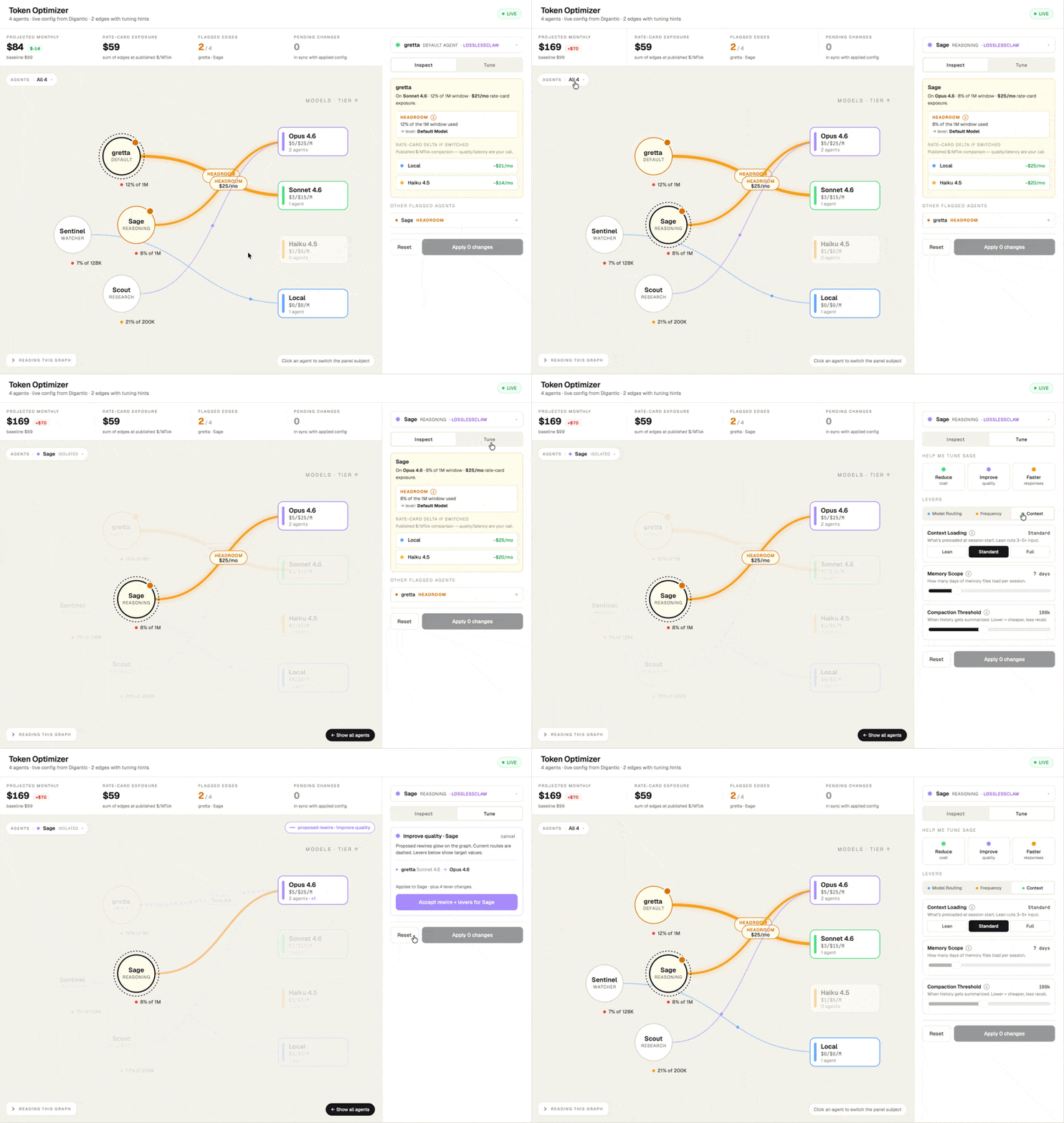
New interface design exploration.
Current Status
OptimoClaw is open source (MIT license) and free. It’s built with Next.js and React, runs on the same machine as your OpenClaw gateway, and connects via WebSocket for live agent data plus CLI integration for config changes.
There’s also an OptimoClaw Skill that brings optimization directly into OpenClaw agents, analyzing live configs and calculating costs across Anthropic, OpenAI, and Ollama models.